
Working with multi-level boards
A set of best practices for API usage on boards with more than two levels of subitems
This release introduces a new board type that enables multiple levels of subitems and a new rollup column capability. This document outlines the new features and provides the API changes you'll need to adapt to.
Summary of changes
- Multi-level boards support up to five layers of subitems and share a consistent column structure between parent items and subitems.
- Multi-level boards are excluded from the default
boardsquery until API version2026-04. - Rollup columns are a new column capability for multi-level boards. They can contain both static and calculated values from child items.
- By default, the API returns empty values for rollup columns. You must pass
capabilities: [CALCULATED]to retrieve them. - Status rollup columns resolve to the
BatteryValuetype instead ofStatusValue— including on leaf items. - Mutations and filtering introduce new behaviors you'll need to handle when writing to or reading from multi-level boards.
Background
We are releasing two new entities in monday: multi-level boards and rollup columns.
Multi-level boards
A multi-level board is a new board type that supports up to five layers of subitems.
Initially, only project boards within the Portfolio solution will support this layout. When creating a Project board, a user can choose this type of layout. The classic board will still be the default when creating a regular board.
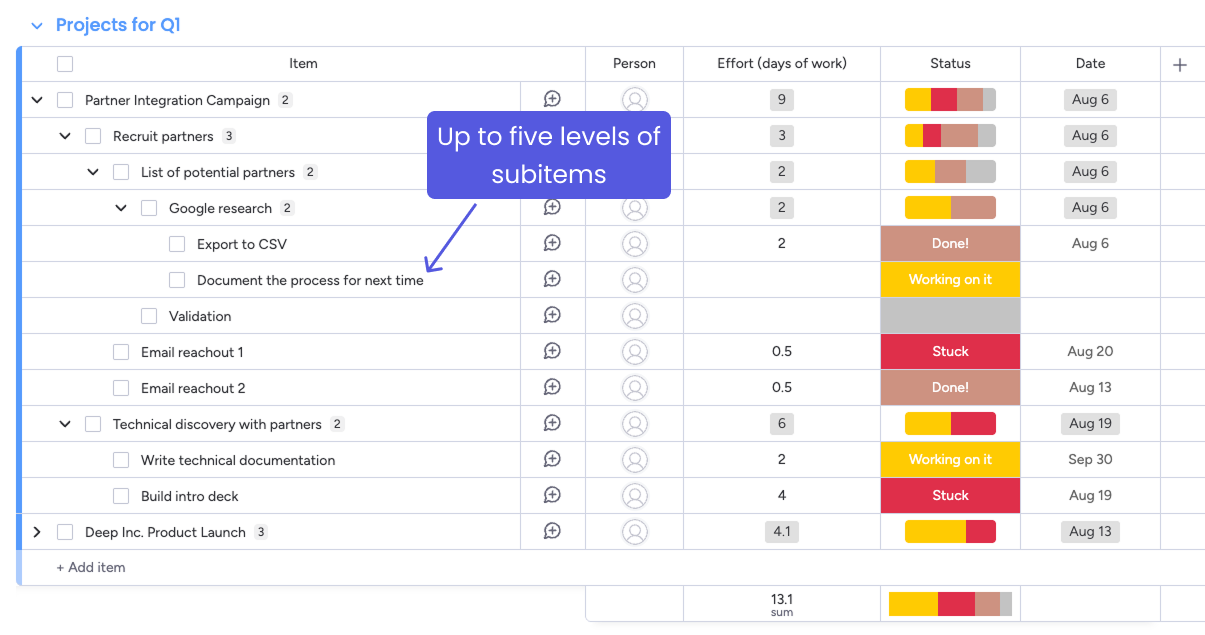
The subitem hierarchy of a multi-level board
Architectural differences from classic boards
Understanding the structural difference between classic and multi-level boards is essential for working with them through the API:
| Aspect | Classic boards | Multi-level boards |
|---|---|---|
| Subitem levels | One level only | Up to five levels |
| Where subitems live | On a separate, hidden subitems board with its own board ID and column structure | On the same board as parent items — all items share the same board ID |
| Column structure | Subitems have their own independent column structure | All items and subitems share the same column structure |
board_id for mutations | Use the subitems board ID when mutating subitems | Always use the main board ID — for both parent items and any-depth subitems |
Returned by boards query | Yes (default) | Not by default until version 2026-04. Use hierarchy_types: [multi_level]. |
On multi-level boards there is no separate subitems board. The main board ID is used for all API operations — querying, creating, updating, and deleting items at any depth.
Rollup columns
With multi-level boards in place, we also needed a way to summarize values across child items. This is where rollup columns come in.
Rollup is a new capability that can be enabled on number, date, timeline, and status columns on multi-level boards.
Columns with rollup can summarize the data in their child items. An individual rollup cell will either contain static data or summarize (roll up) the data of items below it. If an item is a parent, the cell will contain the summary of its child items. If the item has no children, the cell will contain a static value.
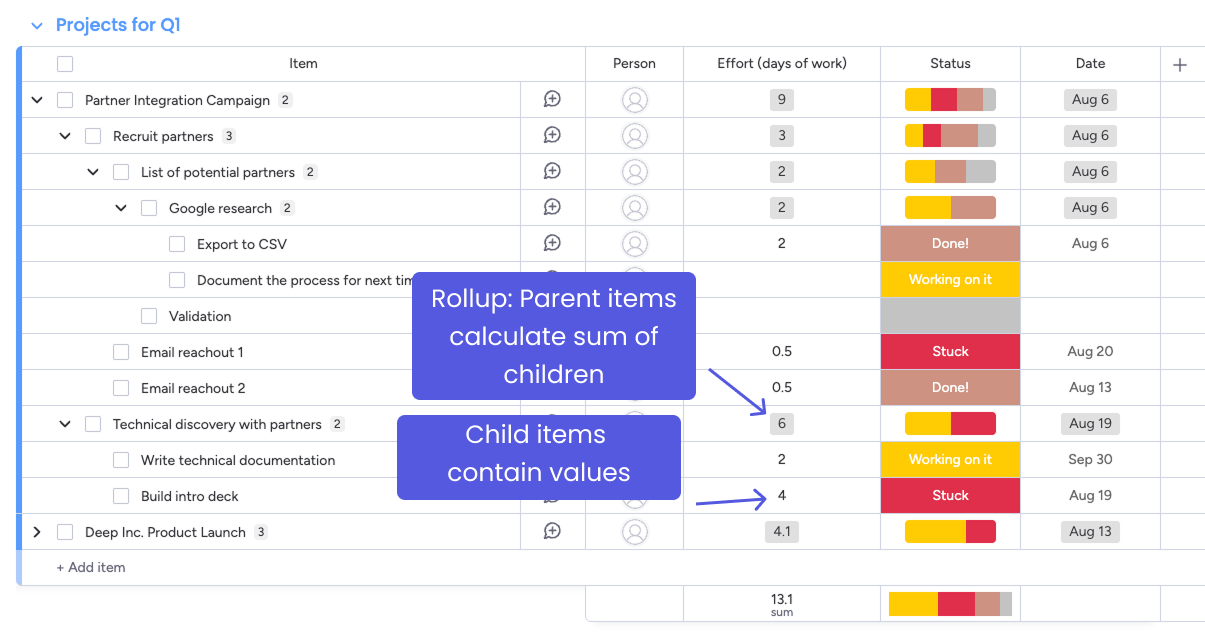
Rollup logic on parent and child items
Supported column types and rollup functions
Each column type supports specific rollup functions:
| Column type | Supported functions | Default function |
|---|---|---|
numbers | SUM, MIN, MAX, NONE | SUM |
date | MIN, MAX, NONE | MAX |
timeline | MIN_MAX, NONE | MIN_MAX |
status | COUNT_KEYS, NONE | COUNT_KEYS |
The NONE function disables rollup calculation on the column, while still keeping the capability metadata.
Estimated timeline
The following timelines differentiate between users' access to the feature and API access. This timeline is subject to change: refer to the API release notes for the most up-to-date information.
| Quarter | User changes | API changes |
|---|---|---|
| Q4 2025 | Alpha testing for a small group of users on Project boards. Developer accounts gain access. | API Version 2025-10:
|
| Q1 2026 | Multi-level boards are an option for all new boards. | API version 2026-04 released to RC. boards query returns both classic and multi-level boards by default. |
| Q2 2026 | No new changes | API Version 2026-04 released as the current default version. |
Backwards compatibility
To prevent breaking existing integrations, we're introducing these features gradually:
- Until
2026-04, onlyclassicboards are returned by default in theboardsquery. Existing queries will behave as before. - All existing mutations still work. Rollup-specific restrictions (like blocked updates) only apply on multi-level boards.
✅ This means existing queries won't break; you'll only need to update code to take advantage of multi-level boards or rollups.
API changes
With the rollout schedule in mind, let's walk through the specific API changes and how to adapt your existing queries.
Multi-level boards
| Multi-level boards | Classic boards | How to mitigate |
|---|---|---|
| Have up to five levels of subitems | One level of subitems only | Subitems can now have their own subitems. Boards have a deeper hierarchy than the previous two-level structure. |
| All items and subitems live on the same board — no separate subitems board | Subitems live on a hidden subitems board | On classic boards, subitems had their own board ID and column structure. On multi-level boards, all items share the same board ID. Always use the main board ID for mutations. |
All subitems are returned by subitems object, regardless of depth | Same behaviour | Use the parent_item field to calculate parent-child hierarchy. |
| Subitems have same column structure as parent items | Subitems have independent column structure | On multi-level boards, all items share the same column structure regardless of their depth. |
Not returned by boards query, by default | Returned by default | For backward compatibility, the boards field will exclude multi-level boards by default. The boards field will return both classic and multi-level boards by default starting in version 2026-04. Use the argument hierarchy_types: [multi_level] to filter for classic or multi-level boards. |
| Filters apply to parent items, by default | Same behaviour | Filters using the items_page or items_page_by_column_values queries will only apply to parent items by default. Pass the optional hierarchy_scope_config argument with the value "allItems" to apply the filter on both items and subitems. If a subitem matches a filter, it will be returned with its parent items too. |
| Archiving, deleting, and duplicating items affect all child subitems as well | Same behaviour | The move_item_to_group, move_item_to_board, archive_item, delete_item, and duplicate_item mutations will apply to the target item and all its children. |
| Creating first subitem copies parent values | Same behavior | Creating the first subitem under a parent copies the parent's values into the subitem (unless values are explicitly provided). Subsequent subitems trigger rollup recalculation but do not copy values. |
| Changing column values (rollup columns): Blocked when the item has ≥1 subitem (parent cell is calculated) | Same behavior | Remove all subitems to edit the parent (unblocks) or update child items instead. |
Rollup columns
| Change | Details |
|---|---|
| Rollup column values are not returned by default | By default, rollup column values will not be returned by the To return rollup values, you must pass the argument This applies to all items on a multi-level board, including leaf items with no subitems. |
Status rollup columns resolve to BatteryValue | Status columns with rollup capability return the Use |
| Number, date, and timeline rollup columns keep their standard types | Unlike status, these columns return their normal types (NumbersValue, DateValue, TimelineValue) regardless of rollup. Use the is_leaf field to distinguish static values from calculated rollup values. |
The is_leaf field on column values | All column value types now include an
|
Columns have a capabilities field to show if they have rollup enabled | The You can also pass |
create_column and update_column mutations have capabilities argument to add, remove, or change rollup function | If omitted, defaults apply: • On multi-level boards, number, date, timeline, and status columns are created with the calculated capability enabled. To disable rollup on a multi-level board, pass |
| Mutations on calculated (rollup) cells silently succeed | Writing to a rollup cell on a parent item does not return an error. The API returns a success response, but the value is not changed — the calculated value remains. Update child items instead. |
| Filters apply across parent items and subitems, including rollup values | Use hierarchy_scope_config: "allItems" on items_page to search both parents and subitems. When a subitem matches a filter, its parent items are included in the response. |
Example queries
Use the following sample queries to get started with multi-level boards and rollup columns.
Multi-level board queries
Check board type with hierarchy_type
hierarchy_typeUse the hierarchy_type field on the Board object to check if a board is multi-level. This field has two possible values: multi_level and classic.
query {
  boards(hierarchy_types: [classic, multi_level]) {
    id
    name
    hierarchy_type
  }
}
{
"data": {
"boards": [
{
"id": "1234567890",
"name": "Product Roadmap",
"hierarchy_type": "multi_level"
},
{
"id": "9876543210",
"name": "Sprint Board",
"hierarchy_type": "classic"
}
]
}
}Get items, subitems, and parent item relationship
This query gets items and their subitems. The parent_item field lets you reconstruct the hierarchy — subitems whose parent_item references another subitem are nested deeper in the tree.
query {
  boards(ids: 1234567890) {
    items_page(limit: 1) {
      items {
        id
        name
        subitems {
          id
          name
          parent_item {
            id
            name
          }
        }
      }
    }
  }
}
{
"data": {
"boards": [
{
"items_page": {
"items": [
{
"id": "1000000001",
"name": "Partner Integration Campaign",
"subitems": [
{
"id": "1000000002",
"name": "Recruit partners",
"parent_item": {
"id": "1000000001",
"name": "Partner Integration Campaign"
}
},
{
"id": "1000000003",
"name": "List of potential partners",
"parent_item": {
"id": "1000000002",
"name": "Recruit partners"
}
},
{
"id": "1000000004",
"name": "Google research",
"parent_item": {
"id": "1000000003",
"name": "List of potential partners"
}
}
]
}
]
}
}
]
}
}The
subitemsfield returns all descendants of an item (flattened), not just direct children. Use theparent_itemfield on each subitem to determine its depth and reconstruct the tree.
Get all items and subitems with hierarchy_scope_config
hierarchy_scope_configBy default, items_page returns only top-level items. Pass hierarchy_scope_config: "allItems" to include all items and subitems in a flat list.
query {
  boards(ids: 1234567890) {
    items_page(limit: 25, hierarchy_scope_config: "allItems") {
      items {
        id
        name
      }
    }
  }
}
When combined with a filter, matching subitems are returned alongside their parent items:
query {
  boards(ids: 1234567890) {
    items_page(
      limit: 25
      hierarchy_scope_config: "allItems"
      query_params: {
        rules: [
          {
            column_id: "numbers"
            compare_value: [100]
            operator: greater_than
          }
        ]
      }
    ) {
      items {
        id
        name
      }
    }
  }
}
Rollup column queries
Get values for rollup columns
By default, rollup column values will not be returned by the column_values field. The API returns an empty array for these columns.
To return rollup values, you must pass the argument capabilities: [CALCULATED]. This will return both rollup and static values:
query {
  boards(ids: 1234567890) {
    items_page(limit: 10) {
      items {
        id
        name
        column_values(capabilities: [CALCULATED]) {
          id
          text
          value
          ... on NumbersValue {
            number
            is_leaf
          }
          ... on DateValue {
            date
            is_leaf
          }
          ... on TimelineValue {
            from
            to
            is_leaf
          }
          ... on BatteryValue {
            battery_value {
              key
              count
            }
            is_leaf
          }
        }
      }
    }
  }
}Without
capabilities: [CALCULATED], thecolumn_valuesfield returns an empty array for rollup-capable columns — even for leaf items with static values. This is true for all items on multi-level boards.
Distinguish static vs. calculated values with is_leaf
is_leafThe is_leaf field exists on all column value types across both classic and multi-level boards. On multi-level boards with rollup columns, it indicates whether a value is static (the item has no children) or calculated (rolled up from children):
query {
  items(ids: [1234567890]) {
    id
    name
    column_values(ids: ["numbers"], capabilities: [CALCULATED]) {
      ... on NumbersValue {
        number
        is_leaf
      }
    }
    subitems {
      id
      name
      column_values(ids: ["numbers"], capabilities: [CALCULATED]) {
        ... on NumbersValue {
          number
          is_leaf
        }
      }
    }
  }
}
{
"data": {
"items": [
{
"id": "1000000001",
"name": "Campaign",
"column_values": [
{
"number": 125,
"is_leaf": false
}
],
"subitems": [
{
"id": "1000000002",
"name": "Phase 1",
"column_values": [
{
"number": 125,
"is_leaf": false
}
]
},
{
"id": "1000000003",
"name": "Task A",
"column_values": [
{
"number": 100,
"is_leaf": true
}
]
},
{
"id": "1000000004",
"name": "Task B",
"column_values": [
{
"number": 25,
"is_leaf": true
}
]
}
]
}
]
}
}In this example, "Campaign" and "Phase 1" show is_leaf: false — their values (125) are the sum of their children. "Task A" and "Task B" are leaves with static values.
Get status column rollup values
Status columns with rollup resolve to the BatteryValue type, not StatusValue. This is true for all items, including leaves:
query {
  items(ids: [1234567890]) {
    id
    name
    column_values(ids: ["status"], capabilities: [CALCULATED]) {
      id
      type
      ... on BatteryValue {
        battery_value {
          key
          count
        }
        is_leaf
      }
    }
  }
}
{
"data": {
"items": [
{
"id": "1000000001",
"name": "Campaign",
"column_values": [
{
"id": "status",
"type": "status",
"battery_value": [
{ "key": "0", "count": 1 },
{ "key": "1", "count": 1 }
],
"is_leaf": false
}
]
}
]
}
}The battery_value array contains one entry per status label that appears among child items. Each entry includes the status label's key (the label ID/index) and the count of items with that status.
On multi-level boards, status columns with rollup capability always resolve to
BatteryValue— even for leaf items. Using... on StatusValuewill not match. Use... on BatteryValueinstead.
Discover rollup-capable columns
Use the capabilities argument on the columns field to filter for rollup-capable columns:
query {
  boards(ids: 1234567890) {
    columns(capabilities: [CALCULATED]) {
      id
      title
      type
      capabilities {
        calculated {
          function
          calculated_type
        }
      }
    }
  }
}
{
"data": {
"boards": [
{
"columns": [
{
"id": "numbers",
"title": "Budget",
"type": "numbers",
"capabilities": {
"calculated": {
"function": "SUM",
"calculated_type": "numbers"
}
}
},
{
"id": "status",
"title": "Status",
"type": "status",
"capabilities": {
"calculated": {
"function": "COUNT_KEYS",
"calculated_type": null
}
}
},
{
"id": "timeline",
"title": "Timeline",
"type": "timeline",
"capabilities": {
"calculated": {
"function": "MIN_MAX",
"calculated_type": "timeline"
}
}
}
]
}
]
}
}Get rollup column metadata
The capabilities field on the Column object provides rollup metadata, including the aggregation function:
query {
  boards(ids: 1234567890) {
    columns(ids: "numbers") {
      title
      capabilities {
        calculated {
          function
          calculated_type
        }
      }
    }
  }
}
The function field returns the active rollup function (e.g., SUM, MIN, MAX, MIN_MAX, COUNT_KEYS, NONE). The calculated_type indicates what type the calculated value resolves to (e.g., "numbers", "date", "timeline", or null for status).
Creating columns with rollup capabilities
Create a column with rollup
On multi-level boards, number, date, timeline, and status columns are created with rollup enabled by default. You can explicitly specify the function:
mutation {
  create_column(
    board_id: 1234567890
    title: "Budget"
    column_type: numbers
    capabilities: { calculated: { function: SUM } }
  ) {
    id
    title
  }
}
Create a column without rollup
To create a column on a multi-level board without rollup, pass function: NONE:
mutation {
  create_column(
    board_id: 1234567890
    title: "Reference Number"
    column_type: numbers
    capabilities: { calculated: { function: NONE } }
  ) {
    id
    title
  }
}Passing an empty
capabilities: {}does not disable rollup on multi-level boards — the column will still receive the default rollup function. You must explicitly passfunction: NONEto disable it.
Status columns use a typed mutation
Status columns have a dedicated create_status_column mutation with a capabilities argument that accepts StatusColumnCapabilitiesInput. The only supported function for status rollup is COUNT_KEYS.
mutation {
  create_status_column(
    board_id: 1234567890
    title: "Task Status"
    capabilities: { calculated: { function: COUNT_KEYS } }
    defaults: {
      labels: [
        { color: done_green, label: "Done", index: 0, is_done: true }
        { color: working_orange, label: "Working on it", index: 1 }
        { color: stuck_red, label: "Stuck", index: 2 }
      ]
    }
  ) {
    id
    title
  }
}
Mutation behavior on rollup columns
Writing to leaf items
Mutations on leaf items (no subitems) work normally. The value is set directly:
mutation {
  change_multiple_column_values(
    board_id: 1234567890
    item_id: 9876543210
    column_values: "{\"numbers\": \"100\"}"
  ) {
    id
  }
}
Writing to parent items (calculated cells)
Mutations on parent items with calculated rollup values do not return an error. The API returns a success response, but the value is not changed — the calculated rollup value remains. To update the parent's displayed value, update its child items instead.
Converting between static and calculated
When you create the first subitem under a parent:
- The parent's static values are copied to the new subitem (unless explicitly provided).
- The parent's rollup columns become calculated — they now reflect the sum/min/max/count of children.
- Subsequent subitems trigger rollup recalculation but do not copy values.
Removing all subitems from a parent converts the cell back to static, allowing direct edits.
Get help
For any questions or feedback, open a support ticket with our team! You can also post in our developer community and one of our experienced monday developers or staff members can help with your questions.
Updated about 2 months ago