
Column View
Learn how to build custom column interactions with dialogs for status, dropdown, formula, and people columns in monday.com apps
Column views enable you to create custom, interactive experiences for status, dropdown, formula, and people columns in monday.com. When users interact with these columns (e.g., clicking, hovering, or accessing settings), your app can display custom dialogs with tailored functionality that enhances the native monday.com experience.
These column views provide:
- Enhanced User Experience: Provide contextual, column-specific functionality
- Seamless Integration: Works naturally within the existing monday.com interface
- Flexible Triggers: Support multiple interaction patterns (click, hover, settings)
- Custom UI: Full control over the dialog content and behavior
- Advanced Logic: Enable complex calculations, validations, and dynamic business rules
Concepts
Column views consist of two key components:
- Board columns: The core component that powers monday.com's column functionality and stores related information (currently supports status, dropdown, formula, and people columns).
- Custom dialog: An interactive view that appears when users trigger specific actions. Your app renders a custom UI inside the dialog to provide additional functionality. You can reuse the same dialog for multiple user interactions or create unique dialogs for different actions.
Supported Actions
| Action Name | Description |
|---|---|
| On Click Dialog | Opens when a user clicks the column cell |
| On Hover Dialog | Opens when a user hovers over the column cell |
| Column Settings Dialog | Opens when a user selects Settings from the column menu. This dialog replaces the native column settings under Settings > Customize settings. It always appears, and if you define a custom dialog here, that dialog will open instead of the default one. |
| Additional Settings Dialog | Opens when a user selects Settings from the column menu. This dialog appears as an extra option under the column’s Settings menu, below Customize settings. It is optional and only shown if you add a custom dialog in this section. |
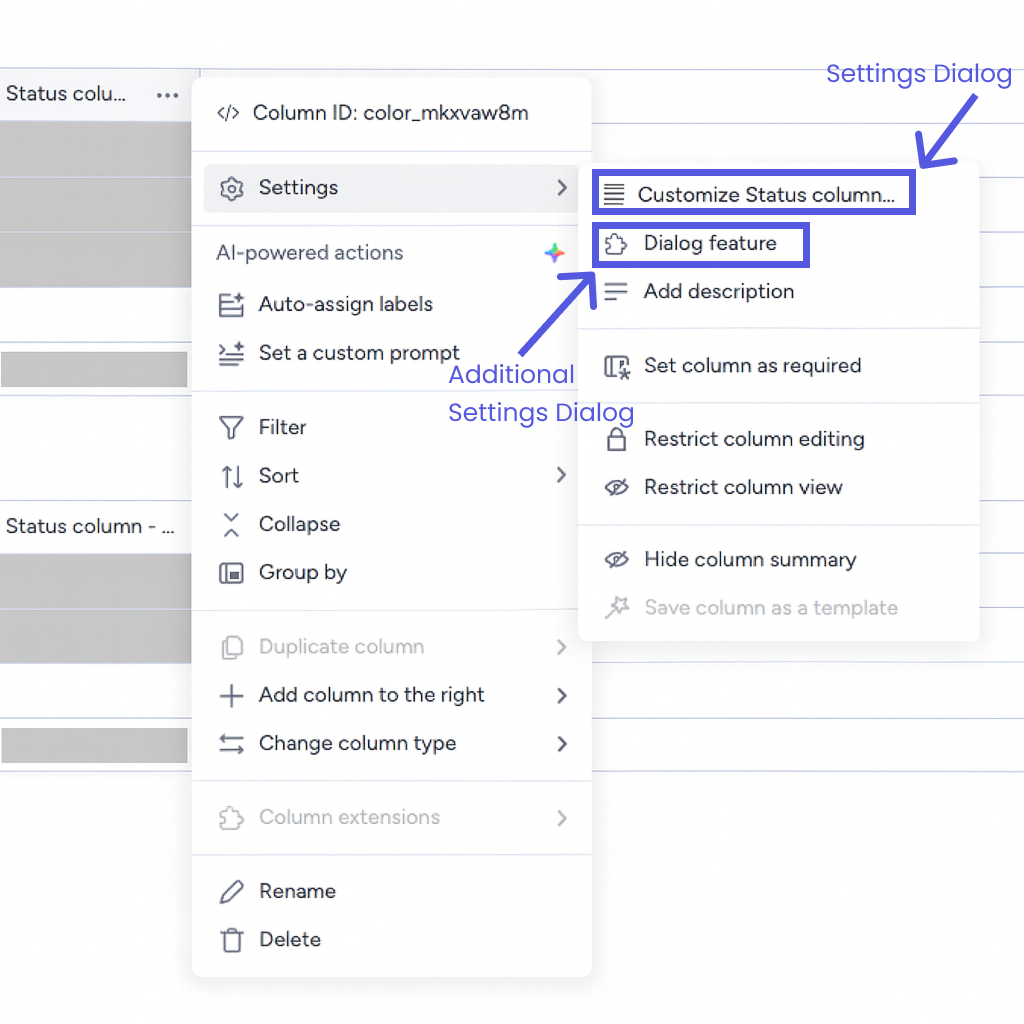
Column Settings Dialog and Additional Settings Dialog options under the column menu.
Getting Started
Pre-requisites
Before creating a column feature, ensure you have:
- A monday.com developer account with app creation permissions (optional, but recommended)
- Basic familiarity with the monday.com API
- A deployment environment configured (for added functionality)
Implementation
Step 1: Create a Column Feature
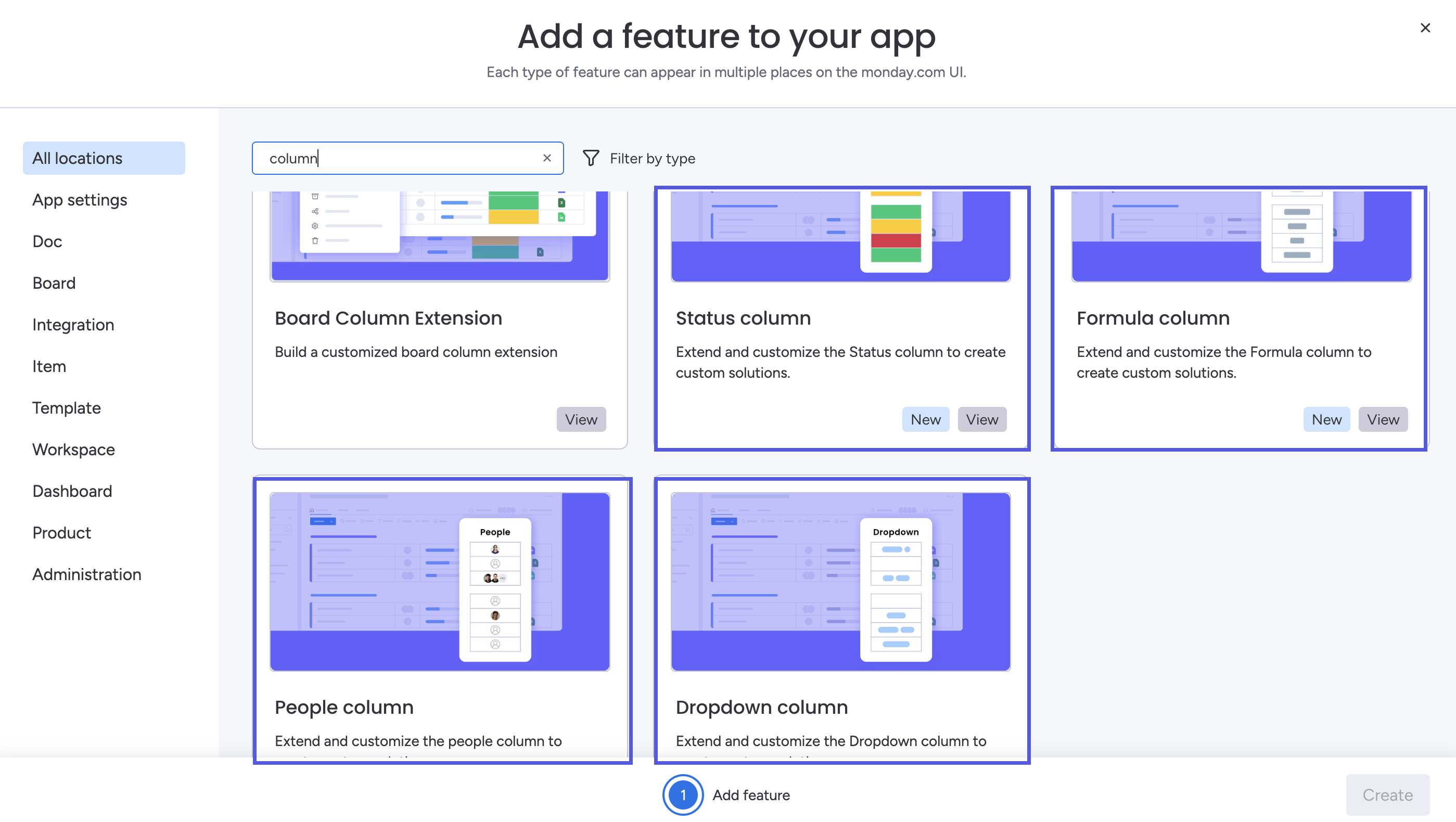
- Create a new feature.
- Type Column in the search bar.
- Choose the Status column, Dropdown column, Formula column, or People column feature.
- Click Create to proceed to configuration.
Step 2: Configure the Feature
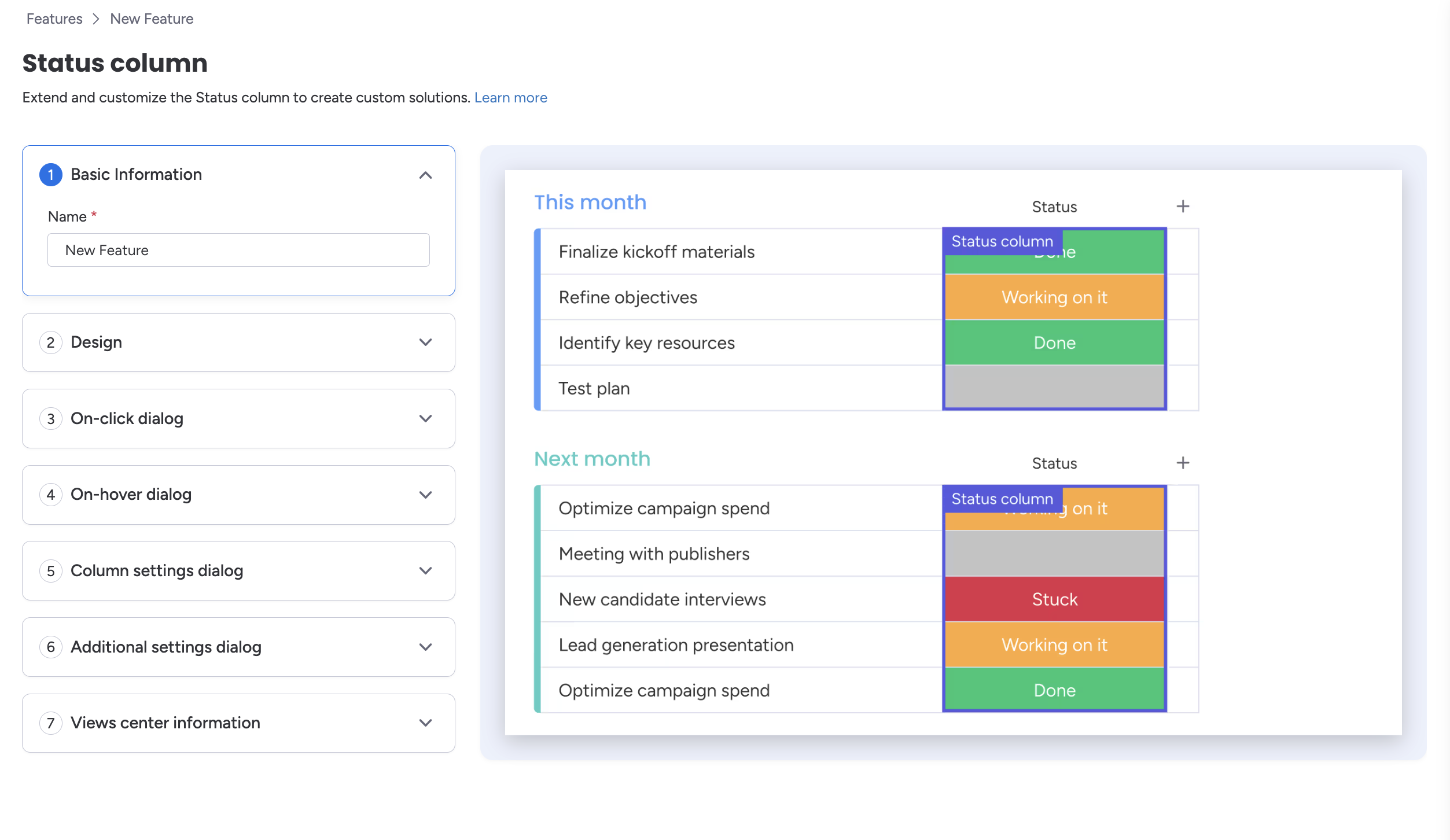
After creating a new Dropdown, Status, Formula, or People column feature, you'll be redirected to the feature configuration page. There, you can configure the following:
- Basic Information: The app's name
- Design: Icon details
- On-Click Dialog: Configure what appears when the column is clicked
- On-Hover Dialog: Configure what appears when someone hovers above the column
- Column Settings Dialog: Configure what appears when the column's settings are selected
- Additional Settings Dialog: Configure what appears when additional settings are selected
- Views Center Information: Write a description and add links that will appear in the Views Center
Step 3: Create and Configure Dialogs
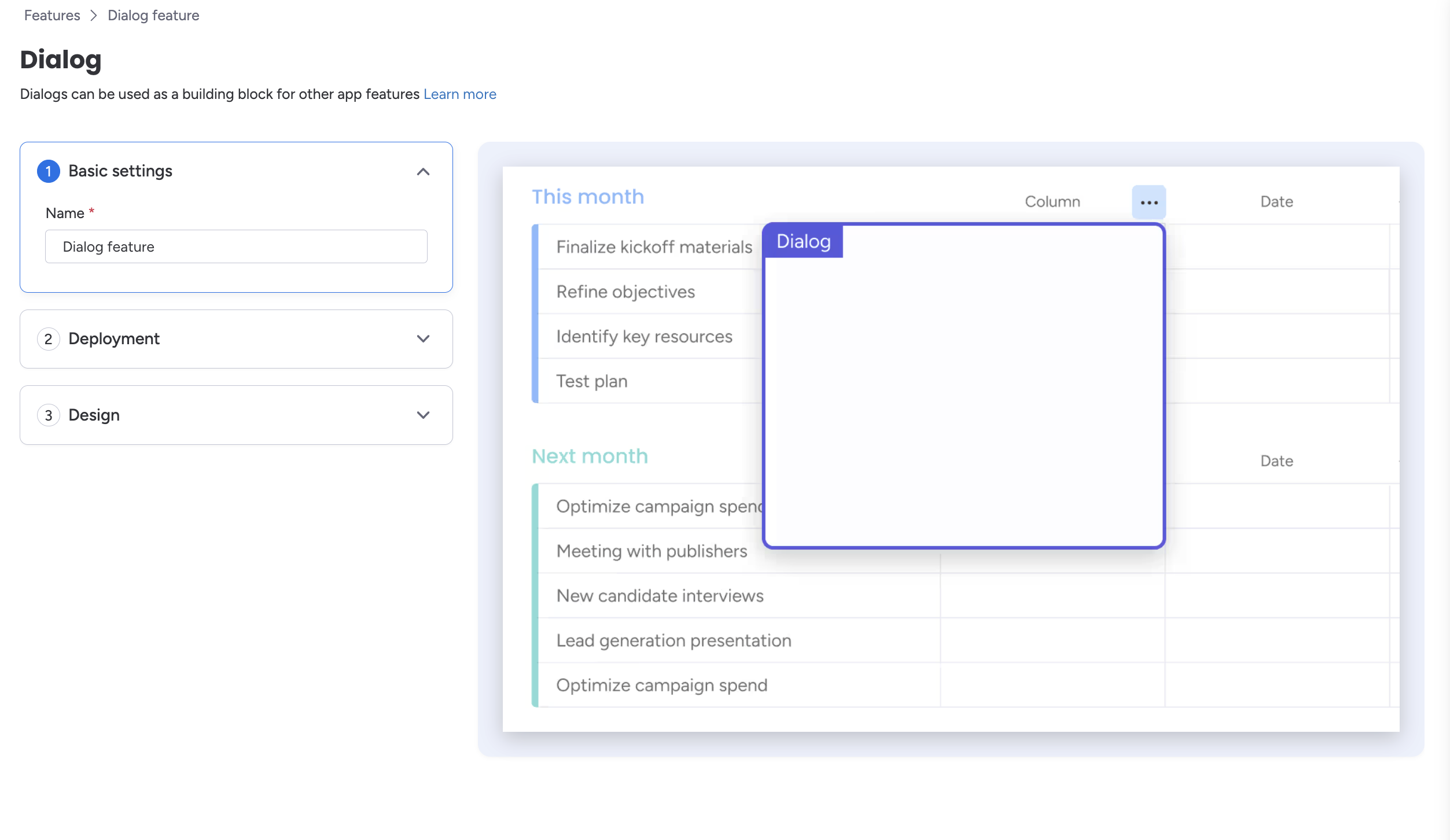
For each dialog type you want to implement:
- On the relevant dialog interaction type (e.g., On-Click Dialog, Additional Settings Dialog), click Add Dialog. This will open a dialog configuration popup.
- Select an existing dialog, or click Create New in the bottom-left corner. This opens a new tab for configuring the dialog.
- In the new tab, you can configure the dialog's:
- Basic Settings: Name
- Deployment: Connect a deployment to populate the dialog
- Design: Customize the dialog's appearance
- Once configured, click Save changes.
- Return to the original tab and select the new dialog to connect it to the relevant interaction.
Reference
API Reference
Column views store metadata and values in native monday.com columns, accessible through the platform API.
Essential API Endpoints
- Column fields: Query a column's metadata via the API
- Status column: Filter, read, update, and clear the status column via the API
- Dropdown column: Filter, read, update, and clear the dropdown column via the API
- Formula column: Read the formula column via the API
- People column: Filter, read, update, and clear the people column via the API
- Change a column's value with a string: Update a column's value via the API
- Change a column's metadata: Modify a column's title or description via the API
Example: Update a Status Column
import mondaySDK from "monday-sdk-js";

const monday = mondaySDK();

const mutation = `
  mutation($itemId: ID!, $boardId: ID!, $columnId: String!, $value: String!) {
    change_simple_column_value(
      item_id: $itemId
      board_id: $boardId
      column_id: $columnId
      value: $value
    ) {
      id
    }
  }
`;

const variables = {
  itemId: 9876543210,
  boardId: 1234567890,
  columnId: "status",
  value: "8"
};

const response = await monday.api(mutation, { variables });
App Context
When a user interacts with your column, your app feature will receive info about the connected column and board via the app context. Each context object contains useful details about the column's value, associated board, and user. You can retrieve your app's context using the monday.listen or monday.get SDK methods.
Here are sample context objects for each feature:
{
  "themeConfig": null,
  "theme": "light",
  "account": {
    "id": "5"
  },
  "user": {
    "id": "4300888",
    "isAdmin": false,
    "isGuest": false,
    "isViewOnly": false,
    "countryCode": "US",
    "currentLanguage": "en",
    "timeFormat": "12H",
    "timeZoneOffset": -5
  },
  "region": "use1",
  "productKind": "core",
  "app": {
    "id": 10180998,
    "clientId": "a667d68ebbceb739ca015146e85aee94"
  },
  "appVersion": {
    "id": 10303119,
    "name": "Column Apps - Dipro",
    "status": "draft",
    "type": "major",
    "versionData": {
      "major": 1,
      "minor": 0,
      "patch": 0,
      "number": 1,
      "type": "major",
      "displayNumber": "v1"
    }
  },
  "appFeature": {
    "type": "AppFeatureDialog",
    "name": "Project priority column - dialog - v1"
  },
  "permissions": {
    "approvedScopes": [
      "boards:read",
      "me:read",
      "docs:read",
      "boards:write",
      "docs:write"
    ],
    "requiredScopes": [
      "boards:read",
      "me:read",
      "docs:read",
      "boards:write",
      "docs:write"
    ]
  },
  "boardId": 108246798,
  "columnId": "project_priority_mkmm73xw",
  "appFeatureId": 11205588,
  "itemId": 256180125,
  "selectedItemIds": [
    256180125
  ],
  "columnType": "color",
  "event": "click",
  "placement": "columnPickers"
}
{
"themeConfig": null,
"theme": "light",
"account": {
"id": "5"
},
"user": {
"id": "4300888",
"isAdmin": false,
"isGuest": false,
"isViewOnly": false,
"countryCode": "US",
"currentLanguage": "en",
"timeFormat": "12H",
"timeZoneOffset": -5
},
"region": "use1",
"productKind": "core",
"app": {
"id": 10180998,
"clientId": "a667d68ebbceb739ca015146e85aee94"
},
"appVersion": {
"id": 10303119,
"name": "Column Apps - Dipro",
"status": "draft",
"type": "major",
"versionData": {
"major": 1,
"minor": 0,
"patch": 0,
"number": 1,
"type": "major",
"displayNumber": "v1"
}
},
"appFeature": {
"type": "AppFeatureDialog",
"name": "Project priority column - dialog - v1"
},
"permissions": {
"approvedScopes": [
"boards:read",
"me:read",
"docs:read",
"boards:write",
"docs:write"
],
"requiredScopes": [
"boards:read",
"me:read",
"docs:read",
"boards:write",
"docs:write"
]
},
"boardId": 108246798,
"columnId": "project_priority_mkmm73xw",
"appFeatureId": 11205572,
"columnType": "color",
"placement": "settings"
}{
"themeConfig": null,
"theme": "light",
"account": {
"id": "5"
},
"user": {
"id": "4300888",
"isAdmin": false,
"isGuest": false,
"isViewOnly": false,
"countryCode": "US",
"currentLanguage": "en",
"timeFormat": "12H",
"timeZoneOffset": -5
},
"region": "use1",
"productKind": "core",
"app": {
"id": 10180998,
"clientId": "a667d68ebbceb739ca015146e85aee94"
},
"appVersion": {
"id": 10303119,
"name": "Column Apps - Dipro",
"status": "draft",
"type": "major",
"versionData": {
"major": 1,
"minor": 0,
"patch": 0,
"number": 1,
"type": "major",
"displayNumber": "v1"
}
},
"appFeature": {
"type": "AppFeatureDialog",
"name": "Project priority column - dialog - v1"
},
"permissions": {
"approvedScopes": [
"boards:read",
"me:read",
"docs:read",
"boards:write",
"docs:write"
],
"requiredScopes": [
"boards:read",
"me:read",
"docs:read",
"boards:write",
"docs:write"
]
},
"boardId": 108246798,
"columnId": "project_priority_mkmm73xw",
"appFeatureId": 11205572,
"columnType": "color",
"placement": "settings"
}Updated 9 months ago