
Discounts
Learn more about providing discounts for monetized marketplace apps
Once your app is monetized, you can focus on increasing app purchases, attracting new users, and converting free users to paid plans. We offer several tools to help you promote your app (read more here), including discounts you can use to reach your goals.
This guide will cover who is eligible for discounts and how to manage them. You can also check out our pricing report to learn more about leveraging discounts to attract and retain users!
Concepts
Offering a discount may seem counterintuitive. Why lower your price if you want to increase revenue? When used strategically, discounts can influence key decision points in the app lifecycle, such as renewals, upgrades, and trial conversions.
They can help:
- Attract new users
- Retain existing users about to churn
- Convert trial and free plan users to paid subscriptions
- Transition customers from their current plan to a higher one
Eligibility
Both potential and existing customers are eligible to receive discounts. Potential customers are those without an existing app subscription, including those on free and trial plans. Existing customers are those with an active app subscription.
Implementation
This section outlines the process of granting a discount from start to finish.
- Determine what discount percentage you'd like to offer and to whom.
- Create the discount in the Developer Center or via the API.
- Once you grant a discount:
- For potential customers, the discounted price is shown during checkout when they select the discounted plan.
- For existing customers, the discount is applied automatically at the next billing cycle or when they switch to a discounted plan.
If they don't see the reduced rate, verify the following:
- The account slug they're using matches the granted discount
- The selected plan ID matches the granted discount
If you've verified the above and the discount still doesn't appear, reach out to our support team here.
- Potential customers must select the discounted plan and create a new subscription. For existing customers, the discount is applied automatically at the next billing cycle or when they change their subscription to a plan that has a discount applied.
- The discount will be applied based on the Created at and Valid until dates.
Manage discounts
You can manage new and existing discounts through the Developer Center or the API.
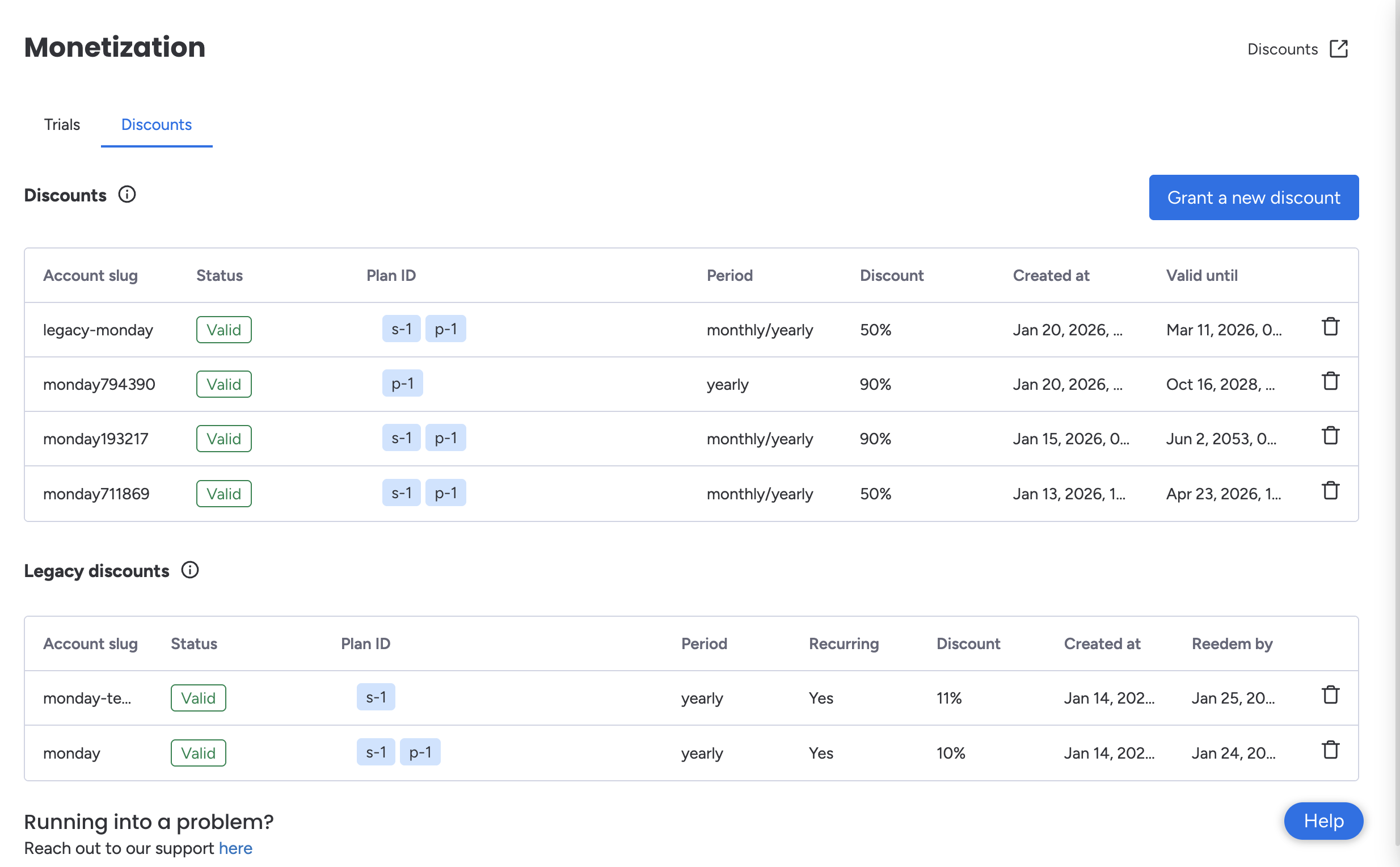
Manage your discounts in the Developer Center
Developer Center
In the Monetization tab, you can create new discounts, delete existing ones, and see a list of your active and inactive discounts.
| Field Name | Description |
|---|---|
| Account slug | The account's slug |
| Subscription |
|
| Discount |
|
| Plan ID | The plan the discount is applied to |
| Period |
|
| Discount | The discount percentage |
| Created at | The discount creation date |
| Valid until | The discount expiration date |
Legacy discounts
You may see an additional table in the Developer Center labeled Legacy discounts. This displays discounts created prior to January 19th, 2026. You will continue to see this table until the discounts are deleted. However, if the discount has already been redeemed, deleting it from this table will not remove the discount from an existing subscription; it will remain active until it expires.
API
Using the API, you can also query your app's discounts, grant new ones, and delete existing ones.
Updated 8 months ago