
Migrating to the new OAuth 2.1 flow
Migrate your monday app from the legacy OAuth flow to the new OAuth 2.1 flow with expiring tokens, refresh tokens, and token revocation.
The new OAuth 2.1 flow introduces several important changes to how your app handles authentication tokens. This guide covers only what you need to change in your existing integration - the authorization request (step 1 of the OAuth flow) remains unchanged.
The key differences in the new flow are:
- Access tokens now expire - you must handle token expiration and refresh.
- Refresh tokens - use them to obtain new access tokens without user re-authorization.
- Token revocation - explicitly revoke tokens when they are no longer needed.
- New token endpoint URL - token exchange uses a different endpoint.
New to OAuth?If you haven't implemented OAuth yet, start with the OAuth and Permissions guide first, then return here to use the new flow.
1. Enable the new OAuth flow
Before migrating, enable the new OAuth flow for your app version in the Developer Center:
- Go to your app in the Developer Center.
- Navigate to the OAuth & Permissions tab.
- Create a new draft version of your app. The toggle is per version.
- Enable the New OAuth Flow toggle for the draft version.
- Test the flow using the draft version by setting it as Active for me.
- After verifying the flow works, promote the draft version to live.
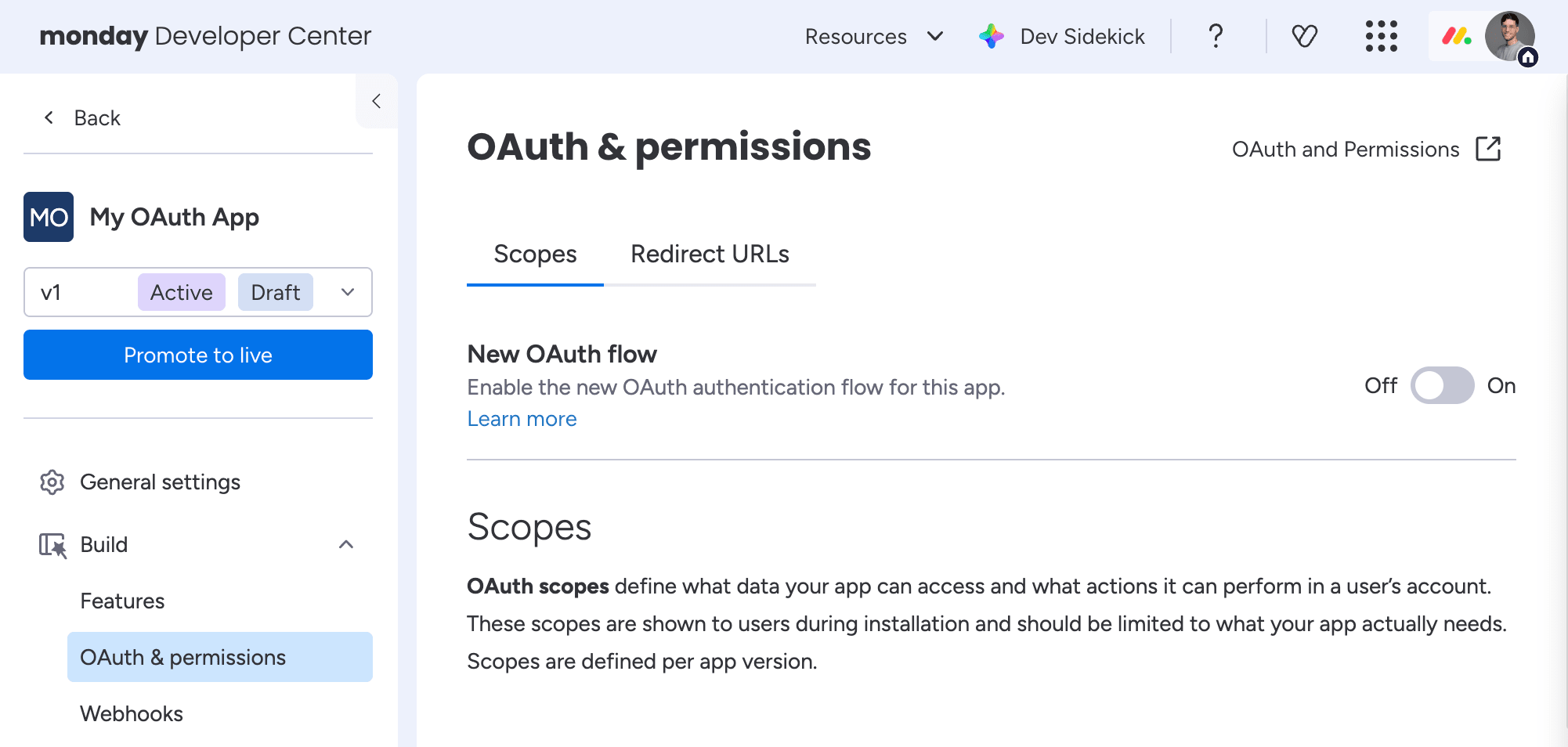
The New OAuth flow toggle in the OAuth & permissions tab
2. Update your token endpoint URL
The authorize endpoint stays unchanged:
GET https://auth.monday.com/oauth2/authorize
It now supports PKCE, which adds the following query parameters:
| Parameter | Description | Required |
|---|---|---|
| code_challenge | A PKCE code challenge (a base64url-encoded SHA-256 hash of the code_verifier). Must be 43–128 characters. See the PKCE section below. | Required |
| code_challenge_method | The method used to generate the code challenge. Only S256 is supported. | Required |
The token exchange endpoint has changed:
| Old flow | New flow | |
|---|---|---|
| Token URL | POST https://auth.monday.com/oauth2/token | POST https://auth.monday.com/oauth_ms/oauth/token |
Update your backend code to use the new URL when exchanging authorization codes for tokens.
To support PKCE, the token exchange request accepts an additional parameter:
| Parameter | Description | Required |
|---|---|---|
| code_verifier | The original PKCE code verifier string (43–128 characters). Required if code_challenge was sent during authorization. See the PKCE section below. | Required |
Updated token exchange request
curl -X POST https://auth.monday.com/oauth_ms/oauth/token \
  -H "Content-Type: application/json" \
  -d '{
    "grant_type": "authorization_code",
    "client_id": "YOUR_CLIENT_ID",
    "client_secret": "YOUR_CLIENT_SECRET",
    "code": "AUTHORIZATION_CODE",
    "redirect_uri": "https://yourapp.com/callback"
  }'
Redirect URIThe
redirect_uriparameter is required in the token exchange request if it was provided in the authorization request.
Updated token exchange response
The response now includes a refresh_token, and the access token has an expiration:
{
  "access_token": "eyJhbGciOi...",
  "refresh_token": "eyJhbGciOi...",
  "token_type": "Bearer",
  "scope": "boards:read users:read"
}| Key | Change from old flow |
|---|---|
| access_token | Now expires. Decode the JWT to check the exp field for the expiration timestamp. Previously, tokens were valid until the user uninstalled your app. |
| refresh_token | New. Use this to obtain a new access token when the current one expires. |
| token_type | No change. Always Bearer. |
| scope | A space-separated list of granted scopes. |
3. Implement token refresh
Since access tokens now expire, your app must refresh them using the refresh token. This does not require user interaction.
POST https://auth.monday.com/oauth_ms/oauth/token
curl -X POST https://auth.monday.com/oauth_ms/oauth/token \
  -H "Content-Type: application/json" \
  -d '{
    "grant_type": "refresh_token",
    "client_id": "YOUR_CLIENT_ID",
    "client_secret": "YOUR_CLIENT_SECRET",
    "refresh_token": "YOUR_REFRESH_TOKEN"
  }'
The response returns a new access token and a new refresh token:
{
  "access_token": "eyJhbGciOi...",
  "refresh_token": "eyJhbGciOi...",
  "token_type": "Bearer",
  "scope": "boards:read users:read"
}
Store the latest refresh tokenEach refresh returns a new
refresh_token. Always store the latest refresh token and discard the old one.
Recommended refresh strategy
- Decode the
access_tokenJWT and read theexpclaim to know when it expires. - Refresh the token proactively before it expires-for example, when less than 5 minutes remain.
- If an API call returns a
401 Unauthorized, attempt a token refresh and retry the request.
4. Revoke tokens
You can now explicitly revoke tokens when they are no longer needed-for example, when a user disconnects your app.
POST https://auth.monday.com/oauth_ms/oauth/revoke
curl -X POST https://auth.monday.com/oauth_ms/oauth/revoke \
  -H "Content-Type: application/json" \
  -d '{
    "token": "TOKEN_TO_REVOKE",
    "client_id": "YOUR_CLIENT_ID",
    "client_secret": "YOUR_CLIENT_SECRET",
    "token_type_hint": "access_token"
}'| Parameter | Description | Required |
|---|---|---|
| token | The access token or refresh token to revoke. Depends on token_type_hint. | Yes |
| client_id | Your app's unique identifier. | Yes |
| client_secret | Your app's secret. | Yes |
| token_type_hint | Either access_token or refresh_token. Helps the server identify the token type. | No |
On success, the response contains:
{
  "success": true
}
5. Server discovery (well-known endpoint)
The OAuth service exposes an RFC 8414 discovery endpoint that lets clients auto-discover all OAuth endpoints, supported scopes, and capabilities without hardcoding URLs.
GET https://auth.monday.com/oauth_ms/.well-known/oauth-authorization-server
Example response (truncated):
{
  "issuer": "https://auth.monday.com",
  "authorization_endpoint": "https://auth.monday.com/oauth2/authorize",
  "token_endpoint": "https://auth.monday.com/oauth_ms/oauth/token",
  "registration_endpoint": "https://auth.monday.com/oauth_ms/oauth/register",
  "revocation_endpoint": "https://auth.monday.com/oauth_ms/oauth/revoke",
  "scopes_supported": ["me:read", "boards:read", "boards:write", "..."],
  "response_types_supported": ["code"],
  "grant_types_supported": [
    "authorization_code",
    "refresh_token"
  ],
  "code_challenge_methods_supported": ["S256"],
  "token_endpoint_auth_methods_supported": ["client_secret_post"]
}| Field | Description |
|---|---|
| issuer | The monday.com base URL. |
| authorization_endpoint | URL to redirect users for authorization. |
| token_endpoint | URL to exchange codes for tokens or refresh tokens. |
| registration_endpoint | URL for Dynamic Client Registration (DCR). |
| revocation_endpoint | URL to revoke tokens. |
| scopes_supported | Full list of available OAuth scopes. |
| response_types_supported | Supported response types (code only). |
| grant_types_supported | Supported grant types. |
| code_challenge_methods_supported | Supported PKCE methods (S256 only). |
| token_endpoint_auth_methods_supported | How clients authenticate at the token endpoint. |
Auto-configure your OAuth clientUse this endpoint to auto-configure your OAuth client. It is unauthenticated and publicly accessible. See the full response at https://auth.monday.com/oauth_ms/.well-known/oauth-authorization-server.
PKCE (Proof Key for Code Exchange)
PKCE protects the authorization code flow from interception attacks, especially for public clients such as mobile apps, single-page apps, and CLI tools. It is required for all apps using the new OAuth flow.
1. Generate a code verifier
Create a cryptographically random string between 43 and 128 characters using unreserved characters ([A-Z] / [a-z] / [0-9] / - / . / _ / ~).
const crypto = require("crypto");
const codeVerifier = crypto.randomBytes(32).toString("base64url");
2. Compute the code challenge
Hash the verifier with SHA-256 and base64url-encode the result:
const codeChallenge = crypto
  .createHash("sha256")
  .update(codeVerifier)
  .digest("base64url");
3. Include the challenge in the authorization request
GET https://auth.monday.com/oauth2/authorize?client_id=YOUR_CLIENT_ID&code_challenge=CODE_CHALLENGE&code_challenge_method=S256
4. Include the verifier in the token exchange
curl -X POST https://auth.monday.com/oauth_ms/oauth/token \
  -H "Content-Type: application/json" \
  -d '{
    "grant_type": "authorization_code",
    "client_id": "YOUR_CLIENT_ID",
    "client_secret": "YOUR_CLIENT_SECRET",
    "code": "AUTHORIZATION_CODE",
    "code_verifier": "YOUR_CODE_VERIFIER"
  }'
The server verifies that SHA256(code_verifier) matches the code_challenge sent during authorization. If they don't match, the token exchange is rejected.
Only S256 is supportedOnly
S256is supported as the challenge method. Plain code challenges are not accepted.
What stays the same
The following parts of the OAuth flow are unchanged and do not require any modifications:
- Authorization URL:
GET https://auth.monday.com/oauth2/authorize(same URL, same parameters). - Permission scopes: Same scope definitions and configuration in the Developer Center.
- Redirect URLs: Same configuration and validation rules.
- Redirect callback: Same parameters-
code,state, andstatus. Checkstatusto confirm the user approved the authorization. - Authorization code: Still valid for 10 minutes, with the same exchange process (just a different endpoint URL).
- Client credentials: Same
client_idandclient_secretfrom the Developer Center.
6. Migrate legacy API tokens
This endpoint is temporary and will be removed once the OAuth 2.1 migration is complete. Do not use it as a permanent authentication strategy.
If you have existing integrations using a legacy monday app tokens, you can exchange them for an OAuth 2.1 access/refresh token pair using the migration endpoint - without requiring the user to go through the OAuth consent flow again.
Only app old API tokens can be migrated.
POST https://auth.monday.com/oauth_ms/oauth/migrate
This endpoint is rate-limited. Avoid calling it repeatedly or in bulk. It is intended for a one-time migration per token.
If you receive a 429 status code, wait 5 minutes before retrying. Build exponential backoff into any migration script - do not retry immediately.
Request
curl -X POST https://auth.monday.com/oauth_ms/oauth/migrate \
  -H "Content-Type: application/json" \
  -d '{
    "api_token": "YOUR_LEGACY_API_TOKEN",
    "client_id": "YOUR_CLIENT_ID",
    "client_secret": "YOUR_CLIENT_SECRET"
}'| Parameter | Description | Required |
|---|---|---|
| api_token | The legacy monday API token to exchange. | Yes |
| client_id | The OAuth client ID of your app (from the app's OAuth settings). | Yes |
| client_secret | The OAuth client secret of your app (from the app's OAuth settings). | Yes |
Response
On success, the response contains a new OAuth 2.1 access token and refresh token:
{
  "access_token": "eyJhbGciOi...",
  "refresh_token": "eyJhbGciOi...",
  "token_type": "Bearer",
  "expires_in": 3600,
  "already_migrated": false,
  "migrated_from": {
    "api_token_id": 12345678
  }
}| Field | Description |
|---|---|
| access_token | The new OAuth 2.1 access token. Use this for all subsequent API calls. |
| refresh_token | Use this to obtain a new access token when the current one expires. See Implement token refresh. |
| token_type | Always Bearer. |
| expires_in | Access token lifetime in seconds. |
| migrated_from | Contains the api_token_id of the original token that was exchanged. |
| already_migrated | true if this token was already migrated in a previous call. No new token was created; the existing one is returned. |
This endpoint is idempotent per token. Calling it multiple times for the same token is safe - it returns the existing OAuth token with
already_migrated: truewith same expiration!
After migration, store the access_token and refresh_token and use the standard token refresh flow going forward.
Error responses
| Status | Error code | Description |
|---|---|---|
| 400 | invalid_request | api_token, client_id, or client_secret is missing or not a string. |
| 400 | already_oauth_token | The supplied token is already an OAuth token — no migration needed. |
| 400 | personal_tokens_not_supported | Personal API tokens cannot be migrated; only app tokens are supported. |
| 400 | invalid_region | The token's region is not recognized. |
| 400 | api_app_id_mismatch | The client_id and client_secret do not belong to the same app as the token. |
| 401 | invalid_token | Token signature is invalid, expired, revoked, or not found. |
| 401 | invalid_client | The client_id does not match the client_secret. |
| 403 | invalid_request | Token migration is currently disabled. |
| 429 | too_many_requests | Rate limit exceeded. Wait 5 minutes before retrying. |
| 500 | — | Unexpected server error. |
Join our developer community!We've created a community specifically for our devs where you can search through previous topics to find solutions, ask new questions, hear about new features and updates, and learn tips and tricks from other devs. Come join in on the fun! 😎
Updated about 1 month ago