
Pricing version upgrade for existing subscribers
Before May 2026, when you published a new pricing version for your app, existing subscribers remained on their legacy plans indefinitely. With the pricing version upgrade feature, you can now transition those subscribers to your latest plans, ensuring all users eventually consolidate onto the same pricing version.
Introduction
When you publish a new pricing version, existing subscribers do not automatically move to the new plans; they stay on their current plan indefinitely. To migrate them, you must opt-in to the pricing version upgrade, which follows these steps:
- Create a new pricing version.
- Select the option to upgrade all users to the new pricing.
- Define the mapping from each old plan to a new one.
- Submit the new pricing version for the approval of our review team.
- Once the pricing version is approved, a 60-day grace period begins. After the 60-day grace period ends, existing subscribers get automatically migrated to the new plan on their next renewal date. If you skip step 2, the new pricing version goes live only for new subscribers, and existing subscribers remain on their current plans indefinitely. This is intentional; the pricing version upgrade is optional. Each time you publish a new pricing version, you decide whether to migrate existing subscribers or leave them on their current plan.
Concepts
Pricing version: A set of pricing plans that your app offers. Each time you update your pricing through a change request, a new pricing version is created. Old plans remain active for existing subscribers until you create a new pricing version and opt in to the pricing version upgrade.
Live version: A pricing version with active subscribers. Your app can have multiple live versions simultaneously - one for each past pricing update that still has customers on it.
Pricing plan mapping: A manual process carried out in the Developer Center that associates a plan from a live pricing version with a plan in the new version you are creating. When a pricing change request is approved, all subscribers on the source plan are automatically migrated to the target plan following the grace period. Each live plan must have exactly one mapping; no plan can be left unmapped or mapped more than once.
Grace period: A 60-day window during which existing subscribers are notified via email of the upcoming price change but continue to be billed at their current rate. The grace period begins on different dates depending on the subscriber's billing cycle (monthly or yearly).
How it works
Pricing version upgrade behaves differently depending on your pricing model.
Feature-based pricing
When you create a new pricing version, you're provided with a mapping tool that helps you map every legacy pricing plan to a new one. For each plan in each legacy pricing version, you specify which new plan its subscribers should be moved to, giving you full control over the migration path.
Seat-based pricing
Mappings between legacy plans and the new ones are done automatically. When you submit a new seat-based pricing version and opt-in to the pricing version upgrade, the system maps all existing subscribers to the correct new plan based on the seat count of the monday account. You don't need to provide mappings yourself.
Migration process
The migration process follows a specific timeline based on the subscription type:
- Monthly subscriptions: The grace period starts immediately once your new pricing version is approved. Customers receive an email notification on the first day of their upcoming renewal cycle following the approved change request, and any billing cycle within this 60-day window will be billed at the old price. The next renewal after the grace period ends will be at the new price.
- Yearly subscriptions: The grace period starts immediately once your new pricing version is approved.
- Subscribers renewing their yearly subscription within the grace period will not receive a notification, and their yearly subscription will be renewed at the old price. They will be migrated to the new price only in the next billing cycle.
- Subscribers renewing their yearly subscription after the grace period ends will receive an email notification 60 days before their renewal date, informing them of the upcoming price change. The new price will apply starting from the renewal date.
Customer notifications
At the start of the grace period, monday.com sends an email notification to all account admins and billing contacts, informing them of the upcoming price change. Notifications are only sent when the new plan costs more than the customer's current plan. If the new price is the same or lower, the migration happens silently, and no notification is sent.
Enable the feature
Prerequisites
To opt in to the pricing version upgrade, your app must have at least one live pricing version.
Step 1: Create a new pricing version
- Open the Developer Center, select your app, and navigate to the Pricing & plans section.
- Click Create new version to create a new pricing version, and then select Upgrade all users to new pricing.

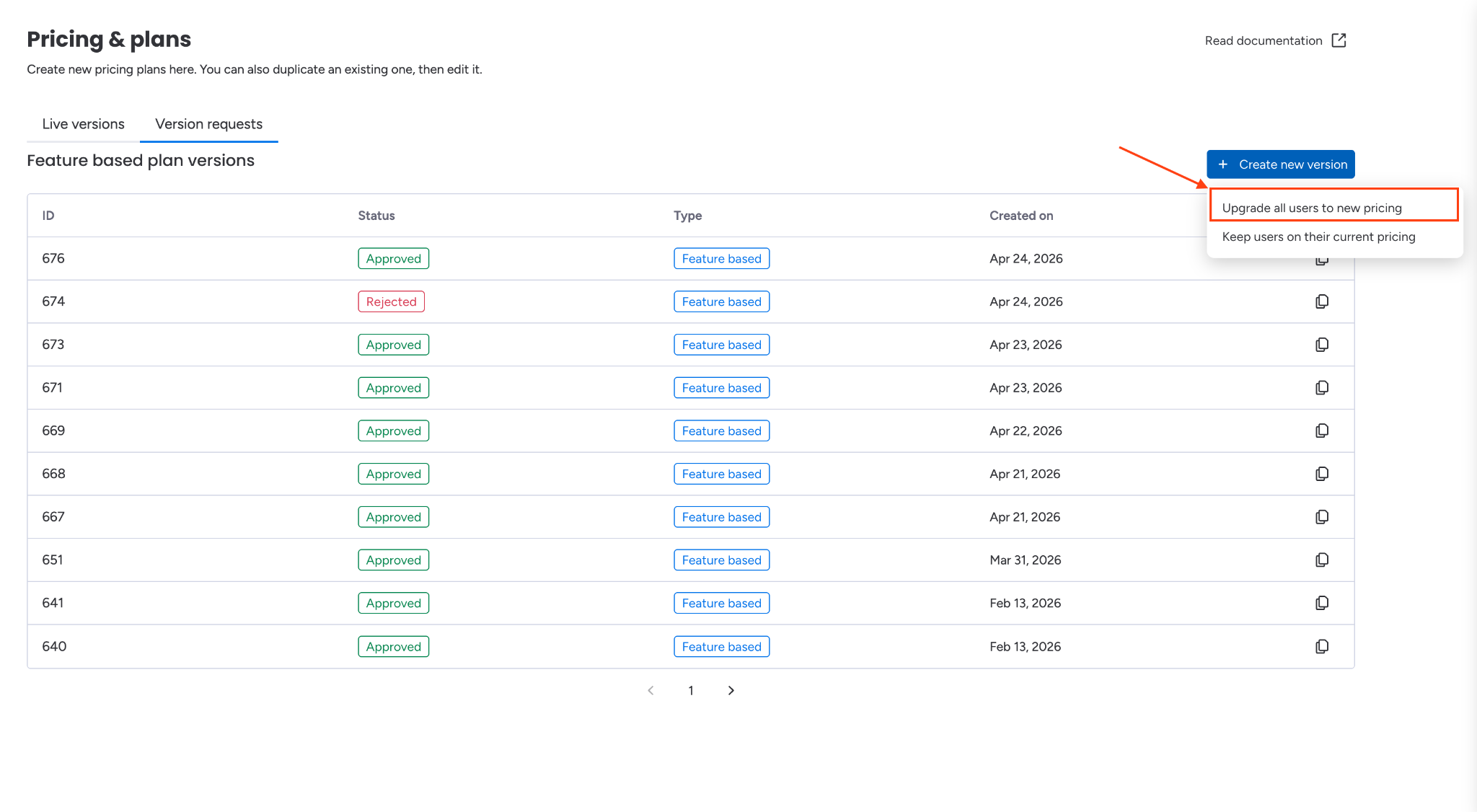
Step 2: Define and map plans
- Define your new plans by setting their name, description, feature list, and price.
- Click Mapping to open the mapping tool
- For every legacy plan in each live pricing version, select the new plan that its subscribers will be migrated to; all legacy plans must be mapped - unmapped plans are not allowed.
- Review your new plans and mappings, then submit the change request by clicking Update all versions and Submit to review. It will enter the review queue for the monday.com marketplace team.
- Note: Once a pricing change request with mappings is approved by our review team, the migration cannot be undone. Make sure your mappings are correct before submitting. You can cancel a pending change request if you notice an error before it is approved
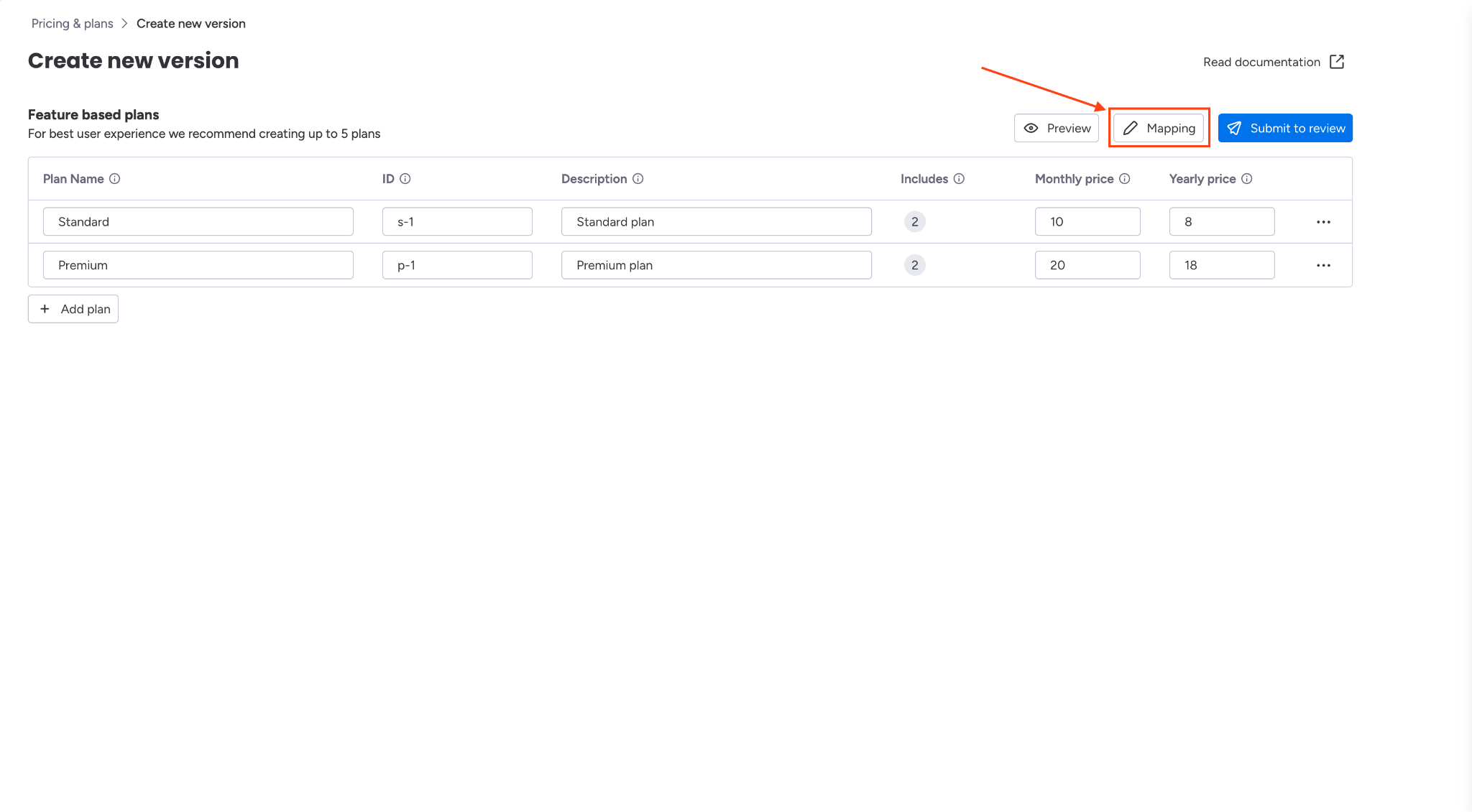
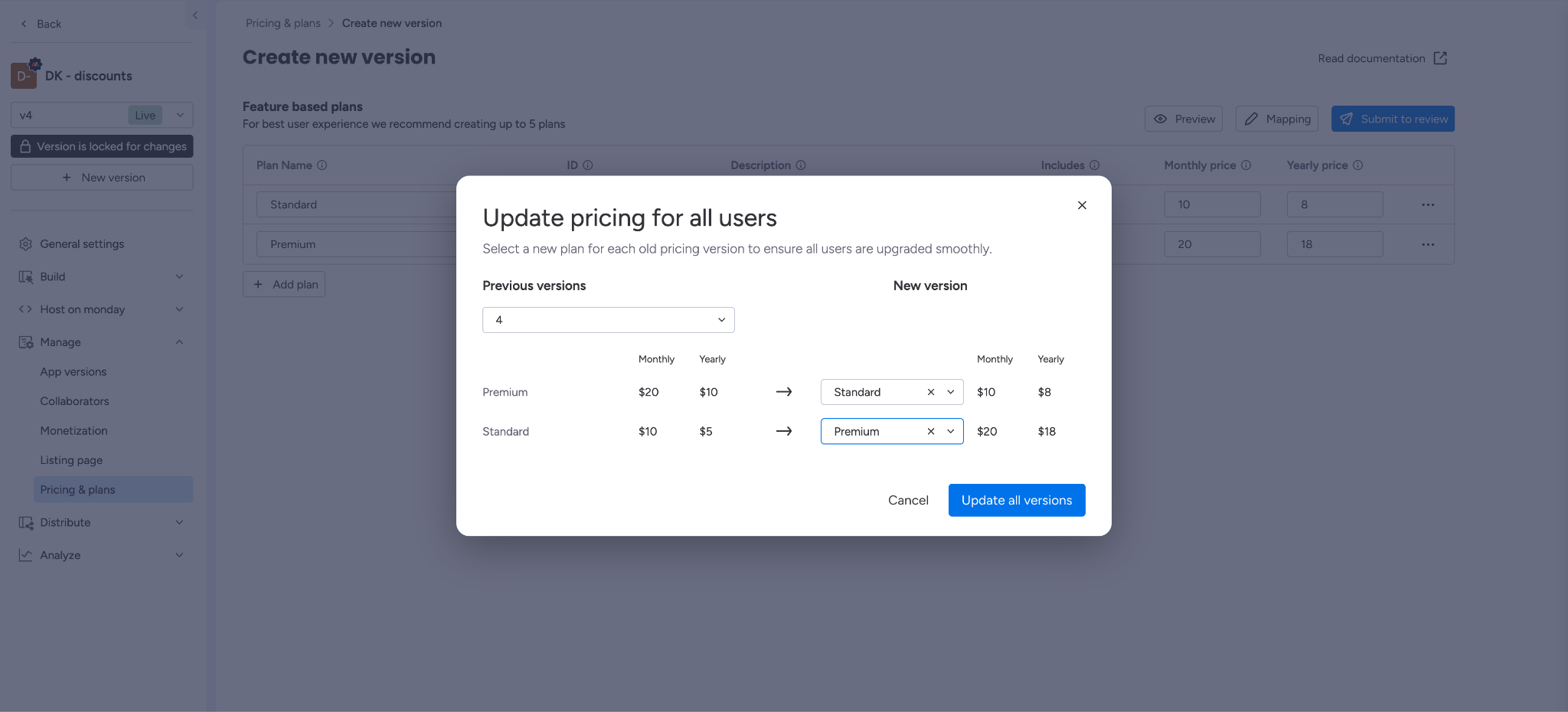
Step 3: Pricing version approval
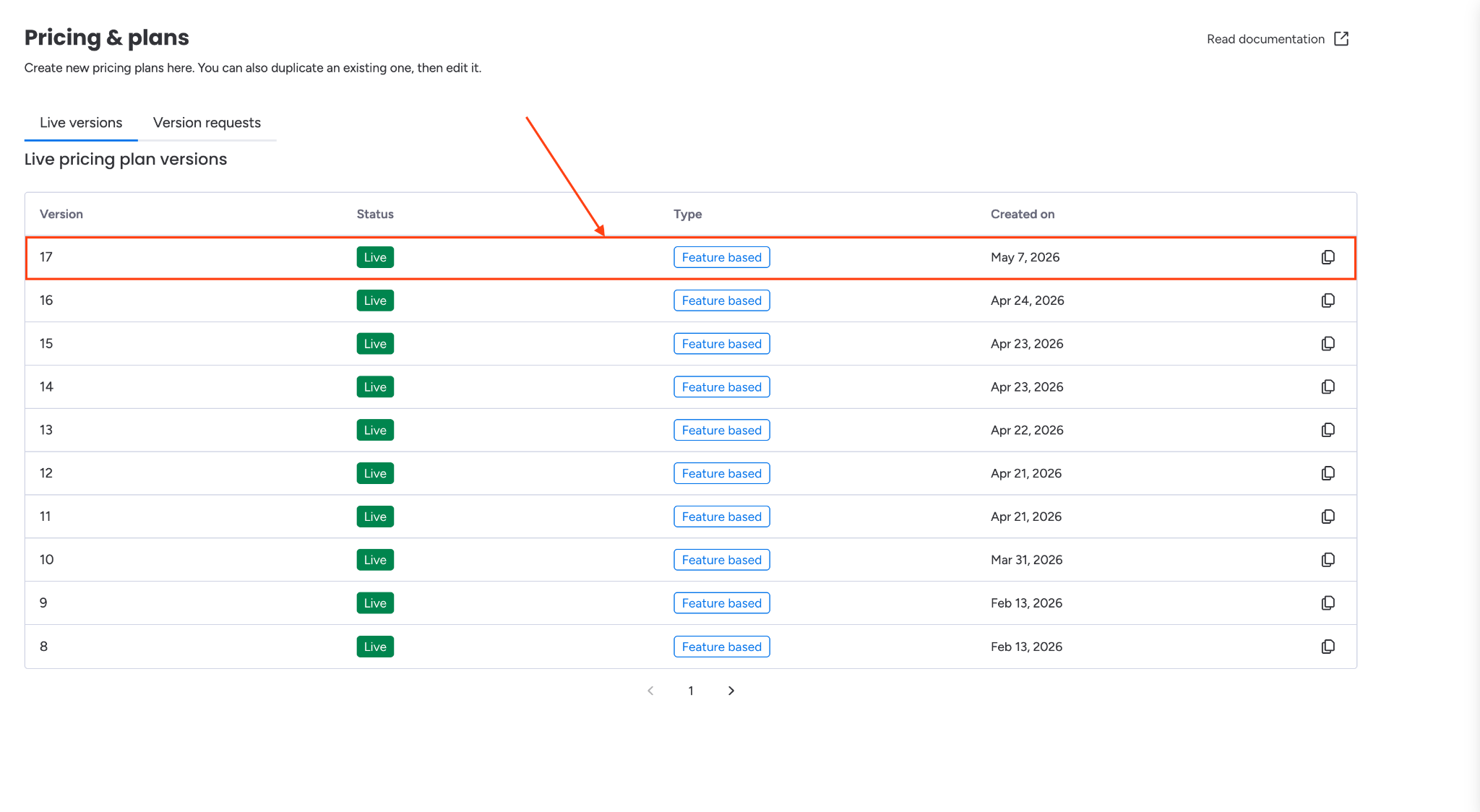
Once our review team approves the new pricing version, it goes live, and all existing subscribers will automatically enter the migration process. You can check the status of your change request approval in the Version Requests section and the status of your pricing version in the Live versions section.
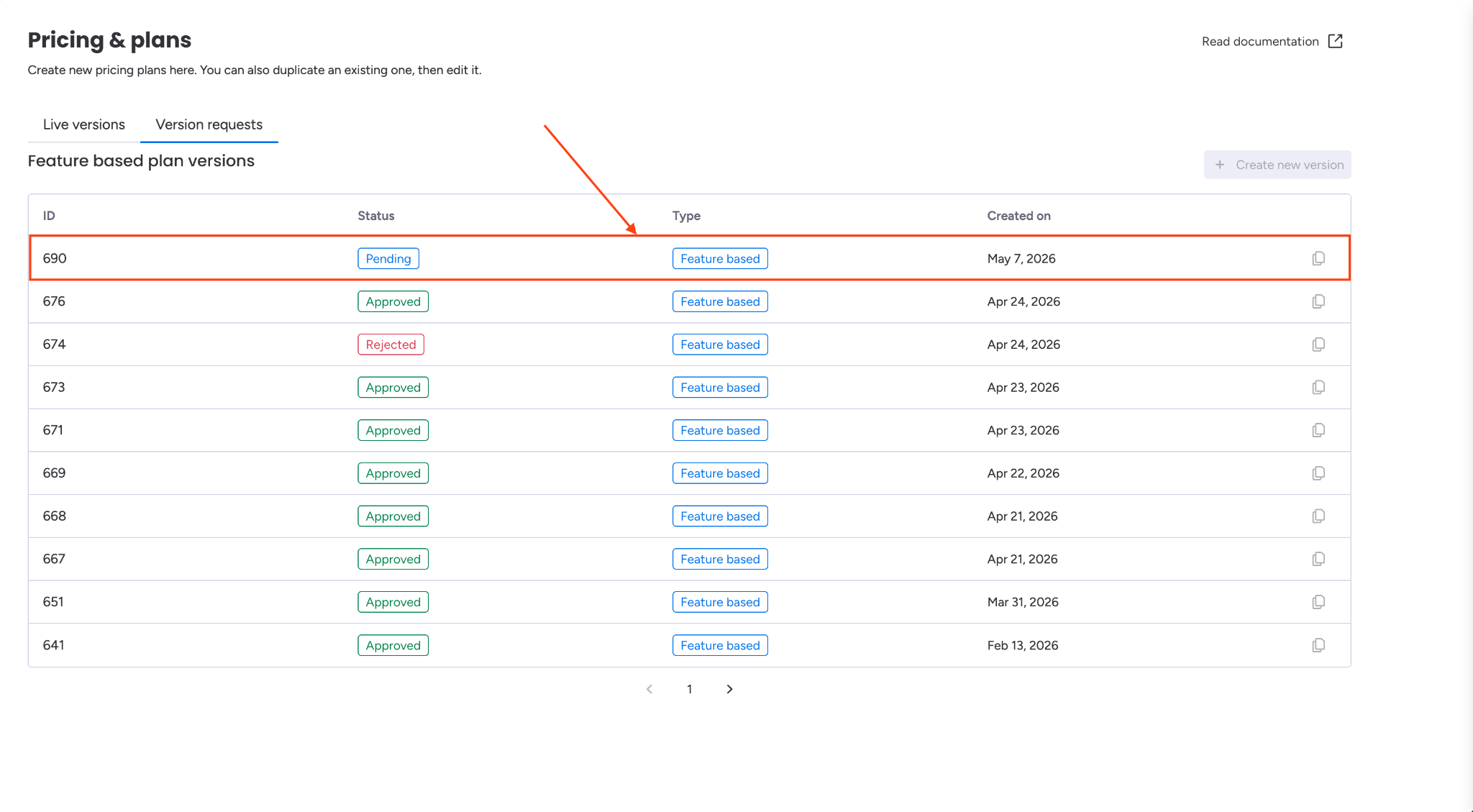
Webhooks
Pricing version upgrade uses two webhook events:
app_subscription_pricing_version_change_scheduled- sent when a user is scheduled for a pricing version change.app_subscription_renewed- sent when a subscription renews.
For more details about webhooks, see the Webhooks documentation.
AMP
AMP also surfaces the app_subscription_pricing_version_change_scheduled and app_subscription_renewed events, so you can track pricing version upgrade activity directly within your lifecycle event dashboard.
For more details about AMP, see the AMP documentation.
Discounts
If a subscription has a discount applied, whether it carries over depends on whether the plan ID remains identical or is different between the legacy and new plans:
- If the new plan ID is identical to the legacy plan ID - the discount carries over to the new plan automatically.
- If the new plan ID is different from the legacy plan ID - the discount is canceled, and you will need to reapply it manually if you want the customer to keep it.
For guidance on applying discounts, see the Discounts documentation.
Note
- If your app currently uses a seat-based pricing model but used a feature-based pricing model in the past, when submitting a new seat-based pricing version with pricing version upgrade enabled, existing subscribers on legacy feature-based plans are automatically migrated to the correct seats bucket. You don't need to define these mappings manually.
- If your app currently uses a feature-based pricing model, only customers on legacy feature-based plans will be migrated to the new plan. Customers on seat-based or legacy seat-based plans will remain on their current plans and cannot be migrated.
Updated 3 months ago